Tampilkan postingan dengan label Google. Tampilkan semua postingan

Selasa, 17 Januari 2012

10 of Google's Free Tools for Keyword Research

Google Free Tools for Keyword Research

Choosing the just the right keywords for your site is truly the key to successful SEO. They define your whole Internet marketing campaign – it revolves around keywords. Thus, if you really want to hit the bull’s eye with your SEO efforts, performing a thorough keyword research is where you’d start.

There is a gazillion of keyword tools out there that help you research keywords from various perspectives. But today we’ll talk about free Google tools that allow you to get valuable keyword intelligence without spending a penny. Some of them you probably heard of, while some names might not ring a bell. In any case, the more keyword research methods you use, the better targeted your search terms will be. So, it won’t hurt to add these Google keyword tools to your SEO toolkit.

1 - Goolge Adwords Keyword Tool

This keyword tool is well-familiar to most SEOs and Internet marketers. It was initially intended to assist Google Adwords advertisers with getting the highest-paying keywords for their PPC campaigns. And it has become a truly indispensible source of keyword ideas for almost every SEO professional.

The app will suggest keywords based on the initial list of search terms you provide or based on your website’s content. It will also tell you the competition rate for each keyword, as well as the number of searches it gets on Google per month.


A keyword’s search volume (aka search popularity) may vary depending on the match type you specify. The tool offers 3 match types – broad, [exact] and “phrase”.

- Broad match will bring you all the phrases that contain your keyword plus synonyms. For example, “designer sunglasses” will be considered a synonym for “designer shades”.

- Exact match will show the number of searches for an exact term, excluding synonyms or longer phrases with that keyword. For instance, it will tell you how many times the exact phrase “designer shades” was looked up on Google.

- Phrase match will also include longer phrases that contain the initial key phrase you specify. For example, ‘buy brand-new designer shades’ and ‘designer shades in different styles and shapes’ will be considered matches for the phrase “designer shades”.


Google Adwords Keyword Tool also groups suggested keywords into appropriate categories, which helps you easier find the ones that are more suitable for your website.


2 - Google Suggest

You must have seen this many times. Once you start typing a search term on Google, you get suggested how to complete your key phrase. These suggestions are not random – they are based on popular terms people search for on Google. To get some unique keyword ideas for you site, start typing your initial keyword and copy the suggestions that appear. You can make a screenshot and convert it into a different format later. Or you can simply write down suggested keywords on a piece of paper – up to you.

The downside of this method is that it’s not very convenient to switch between windows and programs or to take notes manually. Besides, you have to type in each keyword that you want to get ideas for.
3 - Related Searches

The Related Searches section on Google is yet another valuable source to tap into for more keyword ideas. Related searches normally appear at the bottom of a page when you google something up and look like this:

To get even more out of the Related Searches section, hit the More search tools link in the menu on the left and choose the Related searches mode. This time, an extended list of related searches will get displayed at the top of search results:

Besides, each of these prompted terms is clickable. If you click on it, a list of keywords associated with this particular term will be produced. Thus, you get an almost never-ending string of keyword ideas.

Besides, the Related Searches method can also be used inside Rank Tracker, if you choose.
4 - Google Wonder Wheel

Google Wonder Wheel is yet another option you can use to get more keyword tips. It is located right below the Related searches button in the All results menu. Wonder Wheel is a way to graphically present keywords that are related to one another. It is not much different from the Related Searches option, but presents data in a more fun and refreshing way:

The wheel in the center contains your initial search term and is surrounded by related terms. If you click any of those associated keywords, another thematic wheel will appear, with the word you clicked on in the center. This method allows you to easily group words into thematically-related clusters and makes your keyword research easier, not to say, more fun.
5 - Google Sets

Google Sets is a not-so-well-known keyword app by Google that produces sets of things based on the initial terms you enter. You can choose to get suggested a large or a small set of related terms. But even after it has been generated, you can opt to grow the set or shrink it.

6 - Google Trends

Google Trends allows you to see how the popularity of different search terms changes over time. It reflects seasonal fluctuations in certain keyword’s search popularity, and allows you to see which one of your targeted keywords is looked up more often in comparison with a synonymous term. It basically helps you predict seasonal traffic changes and prompts you when a keyword becomes more or less “trendy”.

Besides, it will show what countries certain search terms are most popular in. You can get info on up to 5 words within one single graph that allows you to easily compare them.

Please, note that the table does not show exact search volumes of words. It shows the relation to one another and uses the first keyword you enter as a starting point.

Another valuable insight this tool provides is top 20 most searched for terms on the Web. This way you can define hot topics to write on and discover keywords that will help you optimize your site or blog for Google News.
7 - Google Trends for Websites

Using Google Trends for Websites you can see how the amount of traffic to a particular site changes over time, what other sites those who visit the site you’re analyzing also go to, and what related keywords they look up. The app provides the following statistics:

- The number of visitors to your site and seasonal traffic fluctuations
- The websites those who came to your site also visited
- The keywords those who came to your site also looked up
- The countries your visitors came from


This way you can analyze traffic to your own website or get insight into what’s going on your competitors’ sites. Not to mention this tool is sure to bring you some totally unique key terms your target audiences really search for.
8 - Google Insight for Search

Google Insight for Search is quite similar to Google Trends but provides a wider range of analytical data.

It also shows how keyword trend change over time, tries to predict searchers’ behavior and displays search tendencies in different countries.

It gets you the following statistics:

- Relative popularity of up to 5 search terms and how it changes over time
- Top 10 most popular related searches
- Top 10 fastest-rising searches
- Top 10 countries where the search term is most popular
- Search popularity forecast for 1 year

Before you analyze your keywords, you can set a certain region, timeframe and the span of the Web (Web Search, Image Search, News Search, Product Search) you would like to get analytical data for.
9 - YouTube Keyword Tool

Nowadays a lot of Web marketers employ YouTube immense capabilities to promote their businesses online. YouTube Keyword tool will pinpoint the most popular terms that YouTube users search for. It is very much like Adwords Keyword tool. You can get keyword ideas based on (1) the initial list of keywords you specify, (2) you video’s URL or (3) different user parameters that you specify, such as, age, gender, geographical location, interests, etc.

Just like with Adwords Keyword tool, you can see how many searches a term gets per month. Again, beware of different match types that may influence search popularity statistics.
10 - Google Analytics

And, finally, good old Google Analytics. In case you are just starting a website and do not use Google Analytics yet, you might not know what I’m talking about. Google Analytics is a popular free Web marketing tool that allows you to track your site’s performance and provides diverse analytical data regarding your site.

It also shows keywords that visitors actually used to arrive at your website. Such data is helpful for 2 reasons:

- You can see what keywords on your site bring the most direct traffic
- You can get some more keyword ideas you might have been missing out on


In order to see keyword-related statistics, go to Traffic Sources in the left-hand side menu in your Google Analytics, then choose Search Engines and add the Keyword column to the analysis table.
SEM Blog - Search Engine Marketing Blog

Minggu, 18 Desember 2011

10 of the Fastest-rising Global Queries (Top Google Search 2011)

Fastest-rising Global Queries 2011

Rolling up the year ending stones for 2011 but what do really matters this year’s top 10 search list? Heard of Zeitgeist? Well, according Wikipedia, it is "the spirit of the times" or "the spirit of the age." It is the general cultural, intellectual, ethical, spiritual or political climate within a nation or even specific groups, along with the general ambiance, morals, socio-cultural direction, and mood associated with an era.

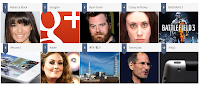
So much for the definition, every year Zeitgeist sorted billions of Google searches to capture the year's 10 fastest-rising global queries and the rest of the spirit of 2011. So here’s the 10 of the Top searched this 2011 according to Zeitgeist 2011.


1 - Rebecca Black

Rebecca Black made a big splash on the Internet with the release of her 2011 pop single “Friday.” The music video catapulted the then 13-year-old to celebrity status after the video went viral, receiving over 167 million views on YouTube.

Searches for Rebecca Black and related searches like Rebecca Black Friday jumped >10,000% between 2010 and 2011, making the young pop singer the #1 fastest rising search on Google in 2011.

Rebecca Renee Black (born June 21, 1997) is an American pop singer who gained extensive media attention with the 2011 single "Friday". Her mother paid $4,000 to have the single and an accompanying music video put out as a vanity release through the record label ARK Music Factory. The song was co-written and produced by Clarence Jey and Patrice Wilson of Ark Music Factory. After the video went viral on YouTube and other social media sites, "Friday" was derided by many music critics and viewers, who dubbed it "the worst song ever." The music video received around 167 million views, causing Black to gain international attention as a "viral star", before being removed from the site on June 16. Black re-uploaded it in her own channel three months later.
2 - Google Plus (G+)

In June 2011, Google entered the social networking space with the launch of Google+. In the three weeks following its announcement, Google+ amassed a user base of more than 10 million people.

The social network grabbed the #2 spot on Google’s list of fastest rising searches after Google+ and related searches like Google Plus shot up by >10,000%.

The service was launched on June 28, 2011, in an invite-only "field testing" phase. The following day, existing users were allowed to invite friends who were over 18 years of age to the service to create their own accounts. This was suspended the next day due to an "insane demand" for accounts. On August 6, each Google+ member had 150 invitations to give out, but on September 20, 2011, Google+ was opened to everyone 18 years of age or older without the need for an invitation. After Google+ went public, users registered to Google+, but those under 18 years of age were unable to sign up for Google+.

Google+ integrates social services such as Google Profiles and Google Buzz, and introduces new services identified as Circles, Hangouts and Sparks. Google+ is available as a web site, and will be available as a desktop application, and is already available as a mobile application, but only on the Android and iOS operating systems. Google has launched an API platform for developers. Sources such as The New York Times have declared it Google's biggest attempt to rival the social network Facebook, which had over 800 million users in 2011.
3 - Ryan Dunn

Best known for his daredevil stunts on the reality TV shows “Jackass” and “Viva La Bam,” Ryan Dunn lost his life in a car accident on June 20, 2011 at the age of 34.

The volume of searches for Ryan Dunn grew >10,000% in 2011, making the Ohio native the third fastest rising search on Google.

Ryan Matthew Dunn (June 11, 1977 – June 20, 2011) was an American reality television personality and daredevil best known for being a member of the Jackass and Viva La Bam crew. He hosted Homewrecker and Proving Ground. A member of the CKY Crew, Dunn played one of the main characters in Bam Margera's 2003 film Haggard: The Movie, which was based on a failed relationship Dunn had experienced. He died at the age of 34 in an alcohol-related car crash in West Goshen Township, Chester County, Pennsylvania.
4- Casey Anthony

Young mother Casey Anthony was charged with first-degree murder when the remains of her 2-year-old daughter Caylee were found in a wooded area near her home in Orlando, Florida. A jury found her not guilty on July 5, 2011.

Searches for Casey Anthony and related searches like Casey Anthony Case grew 2,680% from 2010 to 2011, putting her into the #4 spot of fastest rising searches on Google.

Caylee Marie Anthony (August 9, 2005 – indeterminate ca. June 2008) was an American two-year-old girl who was reported missing in Orlando, Florida, in July 2008, and whose remains were found in a wooded area near her home in December 2008. Her then 22-year-old mother, Casey Marie Anthony, was tried for the first degree murder of Caylee but was acquitted. She was, however, convicted of misdemeanor counts of lying to police officers.
5 - BattleField 3

The highly anticipated release of EA’s first-person shooter video game, Battlefield 3, sold 5 million copies in its first week.

Searches for Battlefield 3 and related searches BF3 jumped 1,773% between 2010 and 2011, making this action game the #5 fastest rising search on Google in 2011.

Battlefield 3 (commonly abbreviated to BF3) is a first-person shooter video game developed by EA Digital Illusions CE and published by Electronic Arts. The game was released in North America on October 25, 2011 and in Europe on October 28, 2011 for Microsoft Windows, PlayStation 3, Xbox 360 and EA Mobile confirmed a port for the iOS platform. It does not support versions of Windows prior to Windows Vista as the game only supports DirectX 10 and 11.

It is a direct sequel to 2005's Battlefield 2, and the eleventh installment in the Battlefield franchise. The game sold 5 million copies in its first week of release, and was released to critical acclaim from most game reviewers. The PC download is exclusive to EA's Origin platform, through which PC users also authenticate when connecting to the game.
6 - iPhone 5

Consumers and analysts alike anticipated the release of Apple’s newest smartphone many months prior to its arrival. Rumored features included a larger screen, edge-to-edge glass, an 8 megapixel camera, and extensive voice controls. Many believed the phone would be called the iPhone 5.

Searches for iPhone 5 rose 1,658% between 2010 and 2011, making the rumored smartphone the #6 fastest rising search on Google.

Consumers and analysts alike anticipated the release of Apple’s newest smartphone many months prior to its arrival. Rumored features included a larger screen, edge-to-edge glass, an 8 megapixel camera, and extensive voice controls. Many believed the phone would be called the iPhone 5.

7 - Adele

Adele rocked the music industry with the release of her sophomore album “21,” which sold 208,000 copies in the UK in its first week and debuted at number one on the UK Albums Chart for 16 consecutive weeks. The album catapulted the 22-year-old to record-breaking success and international acclaim.

Searches for Adele rose 1,588% between 2010 and 2011, making the singer the 7th top rising search on Google.

Adele Laurie Blue Adkins (born 5 May 1988), better known simply as Adele, is an English singer-songwriter. She was the first recipient of the Brit Awards "Critics' Choice" and was named the number-one predicted breakthrough act of 2008 in an annual BBC poll of music critics, Sound of 2008. Since her debut album, 19, Adele has received much recognition both commercially and critically. The album debuted at number one and has been certified four times platinum in the UK. Her career in the US was boosted by a viewer record–breaking Saturday Night Live episode in late 2008. At the 2009 Grammy Awards, Adele won the awards for Best New Artist and Best Female Pop Vocal Performance.
8 - 東京 電力 (TEPCO) Fukushima

The Japanese government ordered the evacuation of thousands of residents living near the 東京 電力 (TEPCO) Fukushima I Plant after the 2011 earthquake badly damaged several nuclear reactors.

Searches for 東京 電力 (TEPCO) shot up 1,470%, making the electric utility company the 8th fastest rising search on Google in 2011.

東京 電力 (TEPCO) Fukushima is an electric utility servicing Japan's Kantō region, Yamanashi Prefecture, and the eastern portion of Shizuoka Prefecture. This area includes Tokyo. Its headquarters are located in Uchisaiwaicho, Chiyoda, Tokyo, and international branch offices exist in Washington, D.C., and London.

In 2007 Tepco was forced to shut the Kashiwazaki-Kariwa Nuclear Power Plant after the Niigata-Chuetsu-Oki Earthquake. That year it posted its first loss in 28 years. Corporate losses continued until the plant reopened in 2009. Following the March 2011 Tōhoku earthquake and tsunami, its power plant at Fukushima Daiichi was the site of a continuing nuclear disaster, one of the world's most serious. TEPCO could face ¥2 trillion ($23.6 billion) in special losses in the current business year to March 2012, and Japan plans to put TEPCO under effective state control as a guarantee for compensation payments to people affected by radiation. The Fukushima disaster displaced 50,000 households in the evacuation zone because of radiation leaks into the air, soil and sea.
9 - Steve Jobs

Steve Jobs inspired millions of people around the world with his passion and creativity. The technological visionary revolutionized the way people live and work with the aid of Mac computers, iPods, iPhones, and iPads.

Searches for Steve Jobs grew 982% in 2011, making the creative genius the 9th fastest rising search on Google.

Steven Paul Jobs (February 24, 1955 – October 5, 2011) was an American businessman and inventor widely recognized as a charismatic pioneer of the personal computer revolution. He was co-founder, chairman, and chief executive officer of Apple Inc. Jobs was co-founder and previously served as chief executive of Pixar Animation Studios; he became a member of the board of directors of The Walt Disney Company in 2006, following the acquisition of Pixar by Disney.

In 1996, NeXT was acquired by Apple. The deal brought Jobs back to the company he co-founded, and provided Apple with the NeXTSTEP codebase, from which the Mac OS X was developed." Jobs was named Apple advisor in 1996, interim CEO in 1997, and CEO from 2000 until his resignation. He oversaw the development of the iMac, iTunes, iPod, iPhone, and iPad and the company's Apple Retail Stores.
In 2003, Jobs was diagnosed with a rare form of pancreatic cancer. Though it was initially treated, Jobs reported of a hormone imbalance, underwent a liver transplant in 2009, and appeared progressively thinner as his health declined. In August 2011, during his third medical leave, Jobs resigned as CEO, but continued to work for Apple as Chairman of the Board until his death.
On October 5, 2011, he died in his Palo Alto home, aged 56. His death certificate listed respiratory arrest as the immediate cause of death, with "metastatic pancreas neuroendocrine tumor" as the underlying cause. His occupation was listed as "entrepreneur" in the "high tech" business.
10 - iPad 2

iPad 2 took the world by storm when 500,000 of the second-generation tablets were sold on their debut weekend. Seen as a sleeker, lightweight alternative to its predecessor, iPad 2 sold out across virtually all channels in its first week.

Searches for iPad 2 rose 939% between from 2010 to 2011, making the tablet the 10th fastest rising search on Google.

The iPad 2 is the second and current generation of the iPad, a tablet computer designed, developed and marketed by Apple. It serves primarily as a platform for audio-visual media including books, periodicals, movies, music, games, presentations and web content, and is available in black or white. The iPad 2 has a lithium-ion polymer battery that lasts up to 10 hours, a new dual core Apple A5 processor and VGA front-facing and 720p rear-facing cameras designed for FaceTime video calling.

Apple unveiled the device on March 2, 2011, began selling it by website and retail stores on March 11, and released it in 25 other countries on March 26, including Australia, Britain and Canada. Apple announced that the iPad 2 would be released in Hong Kong, South Korea, Singapore and other countries on April 29, 2011.

Minggu, 06 November 2011

10 of the Best New Chrome Add-ons


Chrome is now more popular than firefox, and there are lots of ways to make it even faster and smarter. AppsMaster.Net picks 10 of the most useful extensions for Chrome 13.

1 - Listen to Music as you browse the web

+Music is an excellent new Chrome extensions that lets you listen and to share songs by your favourite artists as you browse the web. Simply search for an act to view available tracks and then click to play them. The add-on continues to work in the background as you go about your online activities and lets you queue songs by other artists to listen later. +Music also features Facebook integration for sharing streams with your friends.
2 - View related web content as you type

Google Related helps to speed up your web searches by finding links, photos, new stories, videos and other web content relevant to the page you're viewing. These related suggestions are displayed in a thin toolbar at the buttom of the screen that doesn't obstruct your main view. The extension is particularly useful for displaying information such as maps and reviews of business and products, without having to open a separate browser tab.
3 - Add Facebook events to Google Calendar

If you use Google Calendar to organise your life, this handy extension will let you add Facebook events such as birthdays to your calendar in a couple of clicks. It saves you having to enter or copy and paste the details manually. Once you've installed the Add Facebook Events extension, an 'Add to Calendar' option will appear at the top of Facebook event pages. Click this, then click Save to add the event to your Google calendar.
4 - Share content on multiple social networks

Recognising that many of us have accounts with Facebook, Twitter and Google+, this extension lets you post links, messages and photos to all three social networks simultaneously. Publish Sync for Google+ and Facebook (Green Edition) also lets you share content from one site on a rival service and, in the case of Google+, choose which circles it will appear in. You can easily log out of an account to prevent your post being synchronized.
5 - Look up definitions of words on web pages

If you come accross a word on a web page that you don't recognise or understand, you can use the official Google Dictionary extenstion to find out what it means. Just double-click the word to view definition in a pop-up bubble, or click the toolbar button, enter a word and click Define. Foreign words are automatically translated into English and the latest version of the extension lets you click a speaker icon to hear a word's correct pronunciation.
6 - Always bring a new tabs to the front

When you right-click a URL in chrome and choose 'Open link in new tab', the page always opens in the background behind your current tabs. Install Tabs to the Front, however, and new tabs will open in the foreground by default, so you can view their content immediately.
7 - Change the appearance of web pages

Stylebot lets you adjust the way websites look and feel by playing around with custom style sheets (CSS). Usually, this involves some knowledge of web design but the extension makes it easy for anyone to change the fonts, colours and layout of different page elements.
8 - Edit web pages and photos using Picnik

The Chrome extension for the Google-owed online image editor Picnik (www.picnik.com) lets you capture and edit photos and pages you come accross while browsing the web. Just click the toolbar button and either choose 'Send the visible page to Picnik' or select a specific image. The copied content will open and rotate it, adjust the colours and exposure, and apply a range of effects before saving and sharing the result.
9 - Add Google +1 to all web pages

Google's new +1 feature, which lets you share web content with your friends and contacts, has already been added to thousands of sites. But there are still plenty that don't yet offer a +1 option, which is where this add-on comes in. The awkwardly named '+1 Button - Plus One Button' add-on lets you add your stamp of approval to any web page with single click. You can also see at a glance how many other people have shared the same content.
10. Access Picasa Web Albums from Chrome

Picasa Extension is a simple but very useful Chrome add-on that gives you instant access to Google's photo-sharing service Picasa Web ALbums. Click the Picasa logo on your browser's toolbar to view thumbnail images of all your albums, then simply click one to open it. You can also read comments that have been posted on your photos.

    About Roy Paran, the author

    or more known as Apps Master (@iluvroy) on twitter is your average friend but with an extra-large social media addiction. His love for social media started in September 2008 when he joined twitter and sent out his first tweet from the web. Besides twittering Roy is also a part time internet marketer, editor and a blogger. Offline, Roy is competitive by Nature, Positive Minded and believes that the word “impossible” doesn’t exist and the word “impossible” simply means “Im Possible”

Minggu, 23 Oktober 2011

10 of the Possible Reasons why Google wants Yahoo!

Google-wants-yahoo
A report yesterday [Oct-22-11] freaks me out this early Halloween. I mean, is this a joke? [Mashable] according to The Wall Street Journal, The Great Google is mulling purchasing Yahoo and has contacted at least two venture capital firms to help buy the company’s core business, according to a report.
Google-wants-yahoo
Google and prospective partners have held discussions, but haven’t put forth a formal proposal to buy the search giant, according to The Wall Street Journal, which cited “a person familiar with the matter...”

Hmmm... kinda interesting topic for this week so I research and found these few reasons why Google might buy yahoo!

Here's 10 of the Possible Reasons why Google wants Yahoo!

1 - Google would be interesting to bring in Google’s very own social networking service Google+ to Yahoo’s audience of nearly 700 million unique visitors a month.
2 - The deal will help Google to get a closer access with the current Yahoo’s “premium” content publishers like ABC News.
3 - Part of Google’s attempt to bid up prices to make the acquisition more difficult for competitors such as Microsoft.
4 - Google wants to increase it current ads revenue by selling the ad space across Yahoo sites. Yahoo’s display-ad business including graphical, interactive and video ads is worth a whopping $2 billion annually. Google is the No. 1 player in Web search but in the display-ad market, Facebook is dominating the overall market with projected $2 billion in net revenue this year, with Yahoo generating $1.6 billion and Google generating $1.1 billion.
5 - Part of Google’s strategy to get in the Chinese market’s big giant Alibaba. Currently Yahoo has an approximately 43% stake in Alibaba.com with pre-tax value that worth more than $12 billion dollars.
6 - Google has pile of cash sitting in its coffer – $42.56 billion so buying Yahoo might just be another good idea to diversify its investment.
7 - Google aim to add Yahoo own’s Flickr to their existing portfolio and integrate it into Google+.
8 - Google will be able to lessen their US Corporation Taxes by gradually transfer functions from US Google search to a foreign owned Yahoo.
9 - Google aims the right answers for Yahoo!Answers.
10 - Google wants to show he's always the big daddy!

Thoughts: Well, I like the idea. You know why? I'm a big fan of Google and it will makes life easier for me. *LOL...Ciao!

Jumat, 21 Oktober 2011

10 of the Best Alternatives to Google AdSense (Monetize Online)

Alternatives to Google AdSense
Making money online is one of the many reasons why fellow bloggers keeps on blogging. As bloggers, we aim to share information that we think is something to be shared as well as to get traffic in respected blogs. Of course, bunch of visitors means a great conversion to our online revenues as a take back from giving or spreading valuable info’s throughout the web.

Recently, I meet someone online talking about his site or blog being dismissed or banned by Google Adsense. For those who don’t know what this Adsense is. Google Adsense is a service of Great Google to help blogs/website owners and counterpart to monetize or earn something from their blogs/website by putting some ads on them. (See 10 of Google Adsense Do's and Don'ts for Web Publishers)

Going back to the story, Google Adsense dismissed the Adsense account of this inconsequential friend of mine. He was earning good amount in Adsense for almost 2 years and now he feels so low though still striving. He asked me if there are other alternatives aside from Google Adsense and so *Click!

So here’s my new post for this week – 10 of the best alternatives aside from Google Adsense.

1 - AdBrite

AdBrite is the largest independent ad exchange, reaching 300 million global unique visitors every month, including more than 150 million in the U.S. With site-level transparency and an open platform for data providers and real-time bidders to plug into, we maximize selection and control for advertisers and publishers. Leveraging first- and third-party audience data for advanced targeting is dead simple, and results can be closely monitored through our superior real-time reporting and analysis.
2 - Bidvertiser

In 2003, Bpath spotted the need of website owners to sell their ad space directly to advertisers, overcoming the disadvantages of automated systems, like Google's AdSense and Overture' Content Match, where neither the advertiser nor the publisher has any control of the advertisements' quality, pricing and timing. Bidvertiser On-Site Bid Per Click offers website owners with the ability to sell their ad space, automatically, to the highest bidder, on a price-per-click basis, where the price is mostly effected by the quality and popularity of their website. Advertisers can place ads directly on sites of their choice and pay only when a visitor clicks-through their site. Bidvertiser serves text ads in all types of standard ad units, including banners, buttons, skyscrapers and inline ads.
3 - Chitika

Chitika is a data analytics company in the business of on-line advertising. Through the application of data and innovative technology in the fields of mobile, local and search Chitika has developed a vast global network that maximizes yield for both publishers and advertisers.

When Chitika co-founders, Venkat Kolluri and Alden DoRosario left Lycos in 2003 to start their own company, they sought a name that would suggest the speed with which its customers would be able to put up ads on their Web sites. Chitika, which means "snap of the fingers" in Telugu (a South Indian language), captured this sentiment and Chitika Inc. was born. Chitika introduced its online-ads service in January, 2004.
4 - Infolinks

Established in 2007 and backed by Primera Capital, we combine advanced internet technologies with advertising strategy and extensive buyer-behavior analysis to bring premium advertising to pre-screened websites and blogs worldwide. Advertisers reach global markets with local precision, via 300 million unique views across 50,000+ premium sites that work exclusively with Infolinks.
5 - Pocket Cents

The PocketCents pay per click banner advertising network is built from the ground up so we can focus on the most important aspects of internet marketing. Target markets of your industry at fixed PPC rates! Choose a local audience to place your advertisement in front of and invest in solid results. We are the next generation of online advertising.
6 - Kontera

An advertising network, providing in-text advertising and information services.
Kontera's technology is based on several proprietary semantic, statistical, linguistic, and yield-maximization algorithms that analyze online content, extract and rank topics and keywords, and then match them to relevant advertisements, content, and information. The company's flagship product is called ContentLink.

Kontera was founded in 2003 by co-founders Yoav Shaham, Assaf Henkin, and Henit Vitos. The company is privately held and backed by Sequoia Capital and Carmel Ventures. Kontera is based in San Francisco, with offices in New York City and Herzliya, Israel.

Kontera ads are well represented on the internet and used in over 1% of the top 10,000 websites ranked by traffic.
7 - Clicksor

Clicksor is a contextual advertising network which functions by allowing advertisers to match pre-selected keywords or channels within particular internet content. The advertising formats include inline text links, banners, graphical and rich media banners and pop-under ads. Payment for these ads may be on a CPC, CPV or CPM basis. The minimum charge for advertisers is $20, and the minimum payout for web-content publishers is $50.[4] Clicksor claims to be able to target via time-targeting and geographical targeting, in addition to their keyword based system.
Website owners seeking to earn revenue based on their web traffic can sign up for an account and are given the ability to place Clicksor ad code to display on their sites. Based on the advertisers’ selections of keywords, ads are distributed to these websites based on their site content and relevancy, and ads are matched to the appropriate websites. Clicksor Publishers can place an assortment of text/image banners, rich media banners, full page pop-unders and interstitial ad codes that best suit the design of their website.
8 - Exit Junction

A service of DynamicOxygen Revenue Network which enables publishers of all sizes to realize their full revenue potential without compromising their site's user experience! Our innovative ad solution provides exceptionally targeted ads with high eCPM for your ENTIRE traffic! Yes, we accept international traffic too! As our publisher you get access to a variety of unique ad formats not found elsewhere, such as Interstitials, Layer Ads, Peeler Ads, Anchor Ads, and more... And best of all you also enjoy timely payments and superb support!
9 - Dynamic Oxygen

DynamicOxygen is an online technology company with a mission to disrupt the current search-advertising market! Our company is completely technology driven and we are obsessed with constantly improving our product offerings and build our products based on customer feedback and requests. Since our founding we never lost a sight of our goal: To Lead by Innovation!

We believe in cutting edge innovation and rapid product development. No task is too big and no goal is unachievable for us! We believe in making a difference by building new products that shift the balance of power in the online advertising market! We are passionate about our technology and strongly believe in the value proposition we provide for advertisers and publishers!
10 - AdBull

AdBull, a proprietary division of Lexos Media, provides a contextual-based cursor advertising vehicle that allows content publishers of all sizes the ability to increase monetization up to 500% over other forms of contextual advertising; without displacing space on a page or affect other existing revenue streams. Adbull has been tested to provide higher engagement rates for advertisers than any other contextual advertising vehicle available!

The patented AdBull contextual based cursor ad unit is a unique and revolutionary way for publishers to add a new and non-cannibalistic revenue stream. Similar to other contextual or pay-per-click solutions, publishers enable AdBull by signing up and pasting a simple script into the pages of their websites. AdBull then conducts a semantic page analysis to determine the real-time context of each page and delivers a relevant ad directly to the user's cursor. As a publisher's content changes, AdBull automatically matches the most appropriate ads from its inventory of advertisers and advertiser feeds.

AdBull's automated advertiser interface, advertisers, like publishers stated above, have the ability to sign up and choose relevant keywords that would describe their products/services. Once approved, their ads are then served directly to their most relevant audience.

AdBull ads are only displayed for a few seconds after a user arrives... at a time when 98% of Internet users have their eyes tied to their cursor.

Jumat, 08 Juli 2011

10 of the Most Coolest Features in Google+ (The Plus Project)


Google quoted "Sharing is a huge part of the web, a part that we think could be a lot simpler. That’s why we’ve been working on adding a few new things to Google: to make connecting with people on the web more like connecting with them in the real world. We hope you like what we’ve cooked up so far. And stay tuned, because there’s more to come."

Get a tour on Google+ Project, or get invites once it's ready to the public.

Here's our Top 10 of the Most Coolest Features in Google+ (Plus) Project to be launch soon. (See more Google Services: 10 of Google's Most Useful Internet Tools) and make most out of Google.(See 10 Google Tricks which Usually Neglected)

1 - Circles. Nested Circles. People Want Inception. A circle within a circle.


You share different things with different people. But sharing the right stuff with the right people shouldn’t be a hassle. Circles makes it easy to put your friends from Saturday night in one circle, your parents in another, and your boss in a circle by himself, just like real life.
2 - Sparks. The ability to change the picture when sharing a link.


Remember when your Grandpa used to cut articles out of the paper and send them to you? That was nice. That’s kind of what Sparks does: looks for videos and articles it thinks you’ll like, so when you’re free, there’s always something to watch, read, and share. Grandpa would approve.
3 - Better Streams control. The ability to hide a circle from the main timeline. Right now 90 % of the posts comes from 10 -20 people.
4 - A video Page. Right now you can see all of your images, but you can not see a history of the videos that you posted
5 - Better notification handling. Right now when you click and see that 3 people commented on a post, you will see only the last comment. It would be useful to see from your last comment.
6 - Merge google accounts. Some people have one google account and others that are using for apps development.
7 - The ability to find people based on location.
8 - Integration with google docs. So people can share a question easy , share a documnet with your family, etc.
9 - Iphone App . I see a lot of talking of people considering to buy Android phones just that they can use Google Plus.
10 - API for External Development.

What do you think of this Top 10 list? Is there something else that needs to be add? Or to remove some features that does not deserve to be there...

Not yet launch? Google hopes to do with Google+, so they’re taking it slow.


“It’s not about one particular project, it’s about Google getting better. We know this is going to take us a considerable amount of time. But we want to make Google better by connecting you with your relationships and interests,” Gundotra reiterates. He declined to state how big the team within Google currently working on the project is, but says that it’s a “decent sized team”.

“Today’s web is about people. To organize the world’s data, you have to understand people,” Gundotra concludes, noting that newly crowned CEO Larry Page has been heavily involved in this project from the get-go.

As it is unveiled to the world, Google+ sounds and looks great. But we’ve seen that before from Google. Now what comes is the hard part.
  • Reference/Source: The-google-plus.blogspot.com [July 2, 2011]
  • About

    Google

    When you visit www.google.com or one of more than 180 other Google domains, you can find information in many different languages, check stock quotes and sports scores, find news headlines and look up the address of your local post office or grocery store. You can also find images, videos, maps, patents and much more. With universal search technology, you may see all of these items combined in one result page for your query, and services such as personalized search help you find even more information tailored to your interests. We’re also working to digitize some of the world’s information that until recently hasn’t been online, like books. Search is how Google began, and it’s still at the heart of what we do today. We devote more engineering time to search than to any other product, because search can always get better and faster at helping you find what you want, when you want it, where you want it.

    "Organize the world’s information and make it universally accessible and useful."

Selasa, 05 Juli 2011

10 of Google's Most Useful Internet Tools

Did you know that there's a lot of things you can do with Google Services aside from it's well know search engine? We usually neglected some of these tools and we go Gaga over Google's Youtube and Google Search. Google is a Big-Good-Guy Company - Most of it's tools are useful to online users in accordance to "No Evil Rules" of the company, and to make life gets easier specially in using the net. Makes use of Google to the fullest by using it's worthy services such as the following. Make most out of Google Search. (See Top 10 Google Tricks which Usually Neglected)

Here's the top 10 of Google's Most Useful Internet Tools

1 - Gmail, Google Mail.

For me, this is the best email client ever. The interface is quick and reactive and there are many interesting features. The spam filter is really powerful, i have no more spams since i’ve switched to GMail a long time ago. The storage capacity (~7.4 Go) is also totally enough. Moreover, this client is totally integrated with the other tools of the Google network (Documents, Buzz, Agenda, …). With the plugins, you can also add several others features to GMail including integrating with other tools like RememberTheMilk by example.

The included chat is also a great functionality. I use it everyday.

No more spam with : Google Mail
2 - Google Chrome

Certainly the most efficient browser. The performances of this browser are simply amazing.

There are perhaps less plugins now that in Firefox, but it’s a lot more lighter than the others browsers. The tab system is really well done. If a site crashes, you can simply close the tabs ands that’s fine. You can also move a tab to an other window with drag&drop facilities.

In the last months, the number of modules tend to grow quickly and provides the more useful plugins that we could have used in other browsers before switching to Chrome. And Google Chrome support without plugins the synchronization of bookmarks and execution of GreaseMonkey scripts.

And last but not least, this is the most simplistic (not pejorative at all) browser i use and really easy and comfortable to use.

Try it and why not like it : Google Chrome
3 - Google Analytics

Google Analytics is a really great web analytics solution. This is the most used solution. This tool is free for website with less than 5 million page views by month or for those who have an AdWords account. The interface is really simple to use but powerful. All the stats are displayed with number metrics and graphs. And, really important, the traffic analyzer is powerful and light. You can even use an asynchronous JavaScript code to produce less overhead on the page load time.

You can create scheduled reports and email it at a specific time rate. You can also analyze only a fragment of the traffic and follow accomplishments of objectives. You can also use Google Analytics from other languages like PHP.

For me, as a webmaster, this tool is completely essential and I cannot live without it (exaggerate, but I use it everyday).

If you try it, you will not regret : Google Analytics
4 - Google Reader

Google Reader is a web aggregator to read RSS and Atom. This web application can work in offline mode accessing all the previously downloaded articles.

More to be an aggregator, Google Reader has also social network features. In fact, you can share you favorite articles and comment them. You can access to the shared articles of your friends.

You can create folders to sort your subscriptions by theme (or any kind of sort you like) and quickly find what’s new in any folder. Google Reader can also give you a list of subscriptions take can interest you based on your current subscriptions themes.

Aggregate your RSS and Atom : Google Reader
5 - Google Webmaster Tools

Google Webmaster Tools is an essential tools for all webmaster. With it, you can manage all your websites.

First of all, you can verify how your site is referenced on Google Search Engine. You can see in which position you are for the most important query for your website. You can see which keywords are the significant for your pages, you can obtain the number of links pointing to your website and to which pages there is the more links. You can also notify Google for updates in your sitemaps. Your internal links are also displayed. You can even consult the Google Reader subcribers to your feeds.

Next, you have also diagnostics about your site. The available diagnostics are the malware detected by the Google robots, crawl errors and crawl stats. Google Webmaster Tools give you some suggestions about your HTML pages.

Webmasters will love : Google Webmaster Tools
6 - Google Documents

Google Documents is an online documents sharing application. In that application, you can create and share documents, presentation, spreadsheets, forms and drawings.

More than creating and editing the documents, you can sharing them to anybody that have a Google Acount. The documents are saved by revisions and you can come back to an older revision or merge some revisions. This a really powerful feature when several persons work on the same documents.

All the type of documents can be edited in Wysiwyg way with powerful editors. You can also upload any files you want to your Google Documents account.

Store your Docs, Try : Google Documents
7 - Google Agenda

Google Agenda is a simple tools to keep appointments in mind. You have recall for your events.

You can create events and share them to any other Google contacts.

Organized Schedules, Take a look : Google Agenda
8 - Google Friend Connect

Google Friend Connect is web tools to add social networking features to a website. You can create a community around your website. The visitors can register to your site with simple widgets and no registration using their Google, Facebook or OpenID accounts.

You can add a lot of widgets to your website, by example to give the users the possibility to rate your contact, ask questions to your visitors or send newsletters to them.

Give it a try : Google Friend Connect
9 - Google Adwords, Keyword Tool

Keyword Tool is an application uuseful to get ideas of keywords for your website or to compare some keywords by Advertiser Competition and Search Volume. That can really help you to choose the keywords you will to focus on to improve the referencing of a website.

You can directly give a page of your website to the program. The page will be inspected for keywords and the tool will give you a list of keywords ideas based on the content of the site. Or you can give a list of keywords you’re interested in and the program will compute a list of other keywords based on yours.

I think it’s an essential tool for all webmaster that like to improve its websites referencing.

Find the Right Keyword, Try it : Google Adwords, Keyword Tool
10 - Google Translate, Language Tools

Google Language Tools is a simple set of tools to translate text from a language to another. You have several choices : translate some search results, translate a complete web page or translate a given text. There is a lot of available languages. The page give also an access too Google Homepage in all languages. You can note that this tool is integrated with Google Chrome in which you can translate (automatically or manually) pages to your languages with actions in the browser.

Yes, this very simple, but that works well and that’s really useful.

The most reliable translator, Try it : Google Language Tools
  • Reference/Source: Baptiste-wicht.com by Baptiste Wicht [ April 16, 2010]
  • About

    Google

    When you visit www.google.com or one of more than 180 other Google domains, you can find information in many different languages, check stock quotes and sports scores, find news headlines and look up the address of your local post office or grocery store. You can also find images, videos, maps, patents and much more. With universal search technology, you may see all of these items combined in one result page for your query, and services such as personalized search help you find even more information tailored to your interests. We’re also working to digitize some of the world’s information that until recently hasn’t been online, like books. Search is how Google began, and it’s still at the heart of what we do today. We devote more engineering time to search than to any other product, because search can always get better and faster at helping you find what you want, when you want it, where you want it.

    "Organize the world’s information and make it universally accessible and useful."

Jumat, 01 Juli 2011

10 Google Tricks which Usually Neglected

Google being the biggest and the most reliable search engine in the world. Google helps you search the most specific results you want to find.

Here's the list of our top ten Google tricks many people who use Google don't know about.(See more Google Services: 10 of Google's Most Useful Internet Tools)

1 - They have "Definitions"

Pull up the definition of the word by typing define followed by the word you want the definition for.
For example, typing: define bravura would display the definition of that word.
2 - You may try "Local Search"

Visit Google Local and enter the area you want to search and the keyword of the place you want to find.
For example, typing: restaurant at the link above would display local restaurants.
3 - Try "Phone number look up"

Enter a full phone number with area code may display the name and address associated with that phone number.
4 - Find "Weather and Movies"

Type "weather" or "movies" followed by a zip code or city and state to display current weather conditions or movie theaters in your area.

For example, typing weather 84101 gives you the current weather conditions for Salt Lake City, UT and the next four days.
Typing movies 84101 would give you a link for showtimes for movies in that area.
5 - You may "Track airline flight"

Enter the airline and flight number to display the status of an airline flight and it's arrival time.

For example, type: delta 123 may display this flight information if available.
6 - You can also "Track packages"

Enter a UPS, FedEx or USPS tracking number to get a direct link to track your packages.
7 - Most Common "Pages linked to you" or Link:URL

For webmasters/Bloggers, See what other web pages are linking to your website or blog by typing link: followed by your URL.

For example, typing link:http://always10.blogspot.com displays all pages linking to Always10 - Top 10 List Collection.
8 - Finding PDF results only

Add filetype: to your search to display results that only match a certain file type.

For example, if you wanted to display PDF results only type: "dell xps" filetype:pdf -- this is a great way to find online manuals.
9 - They have "Calculators"

Use the Google Search engine as a calculator by typing a math problem in the search.

For example, typing: 100 + 200 would display results as 300.
10 - Monitor "Stocks"

Quickly get to a stock quote price, chart, and related links by typing the stock symbol in Google.

For example, typing: msft will display the stock information for Microsoft.
  • Reference/Source: Computerhope.com
  • About

    Google

    When you visit www.google.com or one of more than 180 other Google domains, you can find information in many different languages, check stock quotes and sports scores, find news headlines and look up the address of your local post office or grocery store. You can also find images, videos, maps, patents and much more. With universal search technology, you may see all of these items combined in one result page for your query, and services such as personalized search help you find even more information tailored to your interests. We’re also working to digitize some of the world’s information that until recently hasn’t been online, like books. Search is how Google began, and it’s still at the heart of what we do today. We devote more engineering time to search than to any other product, because search can always get better and faster at helping you find what you want, when you want it, where you want it.

    "Organize the world’s information and make it universally accessible and useful."

Jumat, 24 Juni 2011

10 Safe and Smart Hacks for Google Reader

Google Reader is a feed reader. It allows you to subscribe to RSS and Atom feeds. You can manage feeds, label them, and even share your feed collection with others.

Google reader is extremely powerful and has a very clean interface. Google Reader allows you to read your favorite blogs in much the same manner as you would read your email.
Some of it’s many features include tagging, folder-based navigation, Firefox integration and the ability to import and export subscription lists as an OPML file. You can also star items for easy access, share your favorite items, and save your favorite items to del.icio.us.
All of these features have come to make Google Reader a dream machine for the productivity enthusiast.

Here are 10 Smart tips for getting the most out of Google Reader. Remember Google Reader is a powerful tool you've just got to know yet.

1 - Sort your feeds by priority.

Google Reader makes it easy to organize all of your feeds by topic. However, I would also suggest that you categorize
your feeds by priority as well. This way, you know which items are “Must Read” and which items “Can Be Skipped” on days that you’re busy.
2 - Use Keyboard Shortcuts.

You can’t become a Google master without learning the keyboard shortcuts for Google Reader. These little tweaks can save you a good bit of time in the long run.
Some of the most common shortcuts include:

j/k: item down/up
o: open/close item
s: toggle star
m: mark as read/unread
t: tag an item

For a complete list of Google Reader shortcuts, grab this Cheat Sheet.
3 - Optimize your feed reading time by combining certain feeds into one large master feed.

This can be done using FeedShake. Feedshake allows you to merge, sort, and filter multiple RSS feeds. You can also use filters and tags to create a more customized feed.
For a more advanced solution, you can try Yahoo Pipes. Yahoo Pipes is a very powerful RSS feed remixer that gives you the ability to create web mashups that combine a variety of data from different sources. Yahoo Pipes takes web aggregation to an entirely new level.
4 - Add tags to your feed items.

Google Reader lets you organize all of your feed items by tags. This is one of the best features for those who are
looking to optimize their time.
To add a tag to a post, simply click “add tags” and enter the relevant tags.
5 - Search your feed items.

The only feature that I would really like to see in Google Reader that is currently missing is a search feature. Fortunately, there are ways to work around this.
You can use Google Reader Custom Search to search your feeds using Google Co-op inside Google Reader.
6 - Star items for future reference.

Google Reader enables you to quickly star items for future reference. This can come in handy for items that you want to refer to later.
7 - Smart Google Reader Subscribe Button

The Smart Google Reader Subscribe Button makes it easy to subscribe to a site’s RSS feed while also letting you know if you’ve already subscribed to that site. If you subscribe to a lot of feeds, this kind of tool is very handy.
Another great way to add RSS feeds on the fly is with the subscribe bookmark. This tool enables you to quickly
subscribe to any site that you find interesting while surfing the web.
To access the subscribe button, click on Settings on the top right-hand corner of the Google Reader interface and
then click on Goodies. Scroll down to the bottom of the page and you will see detailed instructions on how to use the subscribe bookmark.
8 - Use Expanded View.

For optimum productivity, use expanded view. Expanded view makes it very easy to scroll all of your feed items and
scan for interesting posts.
However, I don’t suggest that you simply scroll down the page. You can go from one entry to the next simply by
pressing the “J” key. Whenever you want to go backwards, use the “K” key to return to the previous post.
9 - Do a weekly or monthly cleanup.

Over time, there are certain feeds that you simply don’t read anymore, or read very infrequently.
These feeds should be dumped on a regular basis to keep your feed reader under control.
Google Reader has an excellent feature known as Subscription Trends that keeps track of where you do the majority of your reading. This will help you to quickly identify any feeds
that need to be dumped.
If your subscription trends reveals a feed that is read less than 5%, then it’s probably time to delete it. Fortunately, you can delete any feed directly from the Trends page.
10 - Dedicate a certain time of the day for reading your feeds and stick to your allotted times.

If you allow yourself 30 minutes to read through your feeds each day, then stick to it. Believe me, everything will still be there tomorrow.

Senin, 20 Juni 2011

10 Tips/Guides to Surviving Google Panda Update (SEO)

For so many people the Panda update is a disaster and there are a lot of people looking into going back to 9 to 5. There is a lot of chaos in the SEO world and article writing world at the moment. Some have even gone as far as saying that article writing as we know it is dead. No matter how the Panda update affects you, the truth is that life will never be the same. You need to remember that this is not the first time that Google updated their Algorithm. However, something major happened that has left even old timers worried.

Even though the intention of this update was genuine, unfortunately, some good sites that target the US-visitors have been hit by the Panda update, as well. If your site is one among those, then here are the top 10 tips to survive the Google Panda Update:

1 - Follow what Google suggests: “If you believe you’ve been impacted by this change you should evaluate all the content on your site and do your best to improve the overall quality of the pages on your domain. Removing low quality pages or moving them to a different domain could help your rankings for the higher quality content.“ (Please see Google Panda Update guidelines link)
2 - Get rid of any possible duplicate content from within your site. Make use of the robots.text to block Google’s bot from scrolling your categories, tags and any other page that might appear as duplicate content.
3 - To help Google bots to get rid of the www and http://www confusion, add “rel=canonical” tags to block either of these versions of your URL structure.
4 - Find out the pages that are affected the most by the Google Panda Update and if these pages have a higher volume of duplicate content then rewrite and tweak them to make them unique.
5 - Stay away of too much advertisements on any particular page. The ratio of content vs. advertisement seem to have an impact on the overall ranking here.
6 - Find out how much of your site (% of pages) is constituted by your lowest quality pages and consider using 301 redirects to point them at the best and high quality pages of your site.
7 - Even if this doesn’t seem important, make sure you edit and ease up any pages that are ‘over optimized‘ [aka 'keyword-stuffed' in an desperate attempt to rank higher].
8 - Work towards a faster and higher quality site/blog that the readers would find informative, filled with quality editorial content and easy to navigate.
9 - For all those photo or video-centric sites or blogs out there, try ensuring that you include some meaningful textual content (related to the images) along with your photo/video galleries.
10 - To survive the loss in traffic caused by this Google Panda Update, opt for social media channels like Facebook and Twitter. Try using these social media platforms to direct traffic to your business site and build up your brand presence.

Here's also 10 top fixes for Google Panda issues from squibble-canig.blogspot.com.
1. Noindex
2. 404 Not Found
3. URL Removal
4. 301 Redirect
5. Disallow: /tag
6. Nofollow
7. DMCA
8. Canonical Tags
9. Parameter Handling
10. Reconsideration Request

Rabu, 08 Juni 2011

10 of Google Earth Finds (Believe it or not)

With its detailed satellite photos, Google's interactive map lets everyone be a virtual globetrotter. And some of the things we've found in our travels are downright bizarre. Columbus and Magellan had it rough. Exploration these days is quite literally an armchair activity, as high-resolution satellite images and tools like Google Earth make it possible for anyone with an Internet connection to pore over the globe with a fine-toothed comb.

There are entire online communities devoted to finding and cataloging the most unusual locales worldwide, creating 21st century atlases of minutiae. It isn't just for hobbyists, either — Google Earth has helped scientists find previously unknown ruins and police locate clandestine marijuana fields. Here are Top10 of the most unusual discoveries.

1 - Atlantis Found?

Might these be the ruins of the lost continent of Atlantis? Eager explorers certainly thought so, trumpeting this grid off the coast of Africa as streets in the mythical sunken city. Observers noted the area appeared to be the size of Wales, making such a large grid an impressive feat of ancient urban planning. The real explanation is far less fun: Google Earth engineers soon announced that the grid pattern was merely a digital artifact created by the sonar boats collecting mapping data. Whispers still linger, but it doesn't look like anyone will be dredging up a forgotten civilization anytime soon.

2 - Firefox Crop Circles

Maybe alien technology isn't so foreign after all. This Firefox crop circle sprouted up in a cornfield in Oregon, but its origins are no mystery. In 2006, the Oregon State University Linux Users group created the giant logo — spanning more than 45,000 sq. ft. — to celebrate the Web browser's 50 millionth download.


3 - UFO Landing Pads, Maybe?

Here's a true Google Earth mystery. These odd formations can be found on air bases in the U.S. and Britain — this one comes from a base outside Norwich, England. The U.K. Ministry of Defense called it a motorcycle range, but other speculate it may be some sort of calibration tool for satellites. No one really knows — and the military isn't saying anything more.


4 - Oprah Maze

She's got a massive syndicated show and a magazine called O, and she was dubbed the most powerful celebrity in the world by Forbes. Why shouldn't Oprah get her own corn maze? An Arizona farmer created this 2004 tribute to the TV talk-show host.


5 - Secret Swastika

When builders of the Coronado Naval Amphibious Base in San Diego planned this complex in 1967, satellite imagery was probably the furthest thing from their minds. But in 2007, Google Earth sleuths found that four unconnected buildings on the base formed an unfortunate shape when viewed from above: a swastika. The Navy says it's spending more than $600,000 to mask the shape. "We don't want to be associated with something as symbolic and hateful as a swastika," a spokesman said.


6 - Lost (and Found) at Sea

The S.S. Jassim, a Bolivian cargo ferry, ran aground and sunk on the Wingate Reef off the coast of Sudan in 2003. Now it's one of the largest shipwrecks visible on Google Earth.


7 - A Face in the Clay

It looks disconcertingly like a face from above, but this formation in Alberta, Canada, is entirely natural. Dubbed the Badlands Guardian, the "face" is actually a valley eroded into the clay. Some say the person appears to be wearing earphones; that's merely a road and an oil well. Even the Badlands Guardian, it seems, isn't immune to exploratory drilling.


8 - Iraq's Bloody Lake

This blood-red lake outside Iraq's Sadr City garnered a fair share of macabre speculation when it was noticed in 2007. One tipster told the tech blog Boing Boing that he was "told by a friend" that slaughterhouses in Iraq sometimes dump blood into canals. No one has offered an official explanation, but it's more likely that the color comes from sewage, pollution or a water-treatment process.


9 - Airplane Graveyard

The Davis-Monthan Air Force Base outside Tuscon, Ariz., is where old planes go to die. More than 4,000 military aircraft are parked on the base, from B-52s to stealth bombers, where they are salvaged for parts and broken down for scrap. It's one of the most popular satellite pictures online, making guided tours of the area a hot ticket.


10 - Missile Test?

Google Earth has plenty of examples of planes, helicopters — even hot air balloons — caught in flight, but this cruise missile, thought to have been fired during military training exercises in the Utah mountains, might be the most unlikely capture yet. If it is, in fact, a cruise missile. Many dispute the image and say it's merely an airplane. You be the judge, but if you look closely, the "missile" appears to have wings.


Want to Confirm? Please visit Time.com for more info.